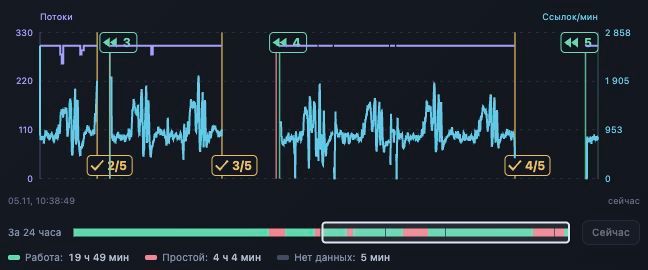
XRumer automation means coordinating runs, checking what executed and preserving enough context to continue after an interruption. Our custom XRumer control panel handled five instances across four Windows hosts by . Two instances shared one host while keeping separate histories.
This is the first article in our series on automating link building operations with XRumer. It documents the control system and its observed behavior. The evidence covers pass management and recovery; link verification and search performance need their own measurements.
What the XRumer control panel automates
XRumer processes targets. The panel manages the work around that engine: selecting the intended instance, sequencing passes, coordinating resource limits and retaining a command history. It is a custom operations layer, separate from the XRumer application.
| Component | Responsibility |
|---|---|
| XRumer instance | Processes the selected base and produces engine status and report categories. |
| Windows agent | Observes the process, handles files and backups, supplies host metrics and performs recovery tasks. |
| Control panel | Keeps instance profiles and series histories, schedules transitions and records command results. |
| Native MCP transport | Provides direct commands on instances where that transport has been enabled. |
| Operator | Chooses the working policy, investigates uncertain states and checks the outputs. |
On opted-in XRumer 23.0.9 instances, native MCP commands handle additional passes, base selection and continuation from a saved position. That reduces dependence on window focus during XRumer remote control. Installing the version alone does not enable the transport.
The distinction matters when planning an automated link building workflow. A completed software operation establishes an operational result. Whether a page contains the intended link is a later check.
Manage multiple XRumer instances with separate histories
A host name cannot distinguish two XRumer processes working on different bases. Each instance needs a stable profile, bound to the current process and Windows agent. Before a command runs, that binding must still identify the intended process.
In our five-instance setup, replacing a process required a fresh binding check. The replacement process could retain the same campaign history. This separates the identity of the work from a temporary process ID.
We also connected a second instance to an occupied host and adopted its running pass without resetting its position. The first instance kept its own history. Both remained subject to the host's shared limits.
For XRumer campaign management across several servers, record the instance profile alongside the base and series identity. Keep a screenshot or observation timestamp with the record. A dashboard row becomes useful for remote decisions only when its state is fresh and its target is unambiguous.
How to automate XRumer runs as confirmed transitions
A typical series in this installation has one full pass followed by up to four additional passes over Remaining targets. Remaining is XRumer's category for targets eligible for further processing. The five-pass plan is an upper bound.
- Confirm the starting context. Match the instance profile, active base and current series. An instance already working can be adopted after its context is checked.
- Complete the current pass. Reaching the end of the list and being ready to accept the next command are separate conditions.
- Evaluate the next pass. Check the Remaining volume and operating limits before requesting more work.
- Confirm the transition. Record the command result, then read fresh engine state to establish that the expected pass started.
- Finish or advance the series. Automatic mode can select the next numbered base part. Confirm the selected file before starting it. Manual mode keeps the selected base when its series ends.
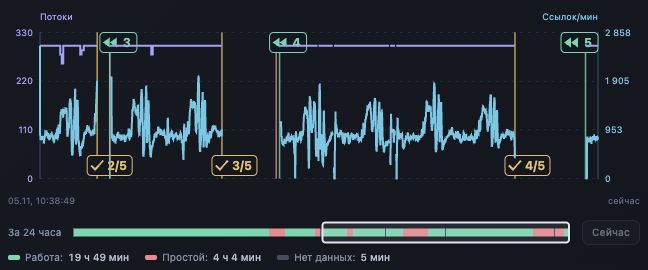
A stale catalog or a missing next part blocks automatic advancement. Our local policy can also finish a series early: if a successfully completed additional pass leaves more than 1 million Remaining entries, it stops further passes on that base. One recorded series ended after pass 2/5 and advanced to the first pass of the next part. This is an operating limit chosen for this installation.
Check MCP execution before retrying or resuming
Sending a command, receiving an acknowledgment and observing execution are different events. Our command journal retains the delivery result; fresh engine observations establish whether the expected work began.
An explicit busy rejection means XRumer declined the operation at that moment. A further attempt requires a checked rejection and a fresh state check. A lost response leaves the result uncertain, so the panel checks the receipt and engine state before deciding what to do. An unknown result does not authorize another send.
The recovery case on November 5 exposed why retry accounting matters. After four completed passes, one instance stopped progressing toward its fifth pass. Recovery required a correction to the retry accounting, a manual XRumer restart and a normal Stop command to finish a stalled tail thread. We resumed the same series and observed position growth on pass 5/5. The second instance on that host continued working. The cause of the stalled thread inside XRumer remains unknown.
A progress value alone is insufficient for resuming a run. In one live observation, MCP progress was 949,475 while LastURL, the saved resume position, was 947,316. The panel accepts a lower resume position only after checking that the saved context belongs to the same base and pass. A mismatch requires investigation before continuation.
Coordinate threads across hosts and shared resources
Separate instance histories still share infrastructure. Independent thread increases can overload a proxy pool or a host running several processes. Our regulator coordinates adjustments across the fleet and waits for confirmation before evaluating the next change.
It considers each proxy package's operating range, host CPU load and XEvil queue pressure. Losing fresh MCP or proxy readings blocks increases. Missing readings are never substituted with zero load.
The XEvil policy uses different thresholds for reducing pressure and restoring threads. Reduction starts when a queue exceeds 20. Restoration requires fresh readings below 5 from all monitored queues. These thresholds belong to this installation; they are not benchmark recommendations for every XRumer setup.
The new queue branch passed tests, but the queue had already drained before activation. That rollout does not measure an improvement caused by the branch. A performance comparison would need comparable workloads and observations before and after the change.
Read the XRumer dashboard without inventing activity
A newly connected instance has no panel history for the hours before collection began. The dashboard separates working time, confirmed idle time and periods without observations.
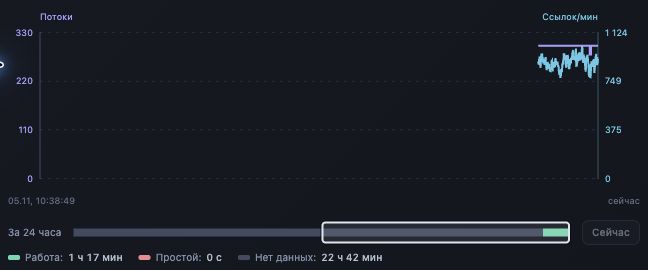
Speed also needs a state check. In an earlier stopped interval, XRumer's raw speed counter remained at 282 across 276 observations. Correcting how the panel displayed that retained counter improved the record. It did not increase processing throughput.
Before comparing instances, check the observation period and active base. Different target lists and incomplete histories do not form a controlled performance test.
Separate run reports from verified backlinks
Successful and Partially successful entries, profiles and activations are XRumer result categories. Additional passes can retain cumulative totals. Summing those totals across passes can count reported events again, so the panel keeps the final snapshot from the last pass for each completed base.
As of the November 5 snapshot, report merging, analyzer launch and export were not connected into an unattended pipeline. The operator changed analysis status manually. Search phrases and analyzer preferences were stored separately.
A Content-mode match establishes that the searched text was found. Confirm the intended link element and destination separately, then recheck retention later. Indexation, rankings and traffic require their own observations. This case has no measured SEO uplift or controlled estimate of labor savings.
Google's link spam policy includes automated services that create links to manipulate rankings. Keep that constraint in the scope of any XRumer link building engagement; operational automation does not establish search-policy compliance.
Use the XRumer run checklist
Use one row per intended transition or recovery decision. Complete the context fields before sending a command, then fill the delivery and observation fields from the resulting evidence.
- Before starting: identify the instance and confirm a fresh process binding. Record the base, series and pass.
- Before advancing: check the operating limits and Remaining count. For a new base part, confirm the selected file.
- After a command: record the delivery result and acknowledgment separately. Add a fresh observation of the resulting state.
- Before resuming: validate the saved base and pass context. Record progress and the saved resume position in separate fields.
- At completion: preserve the final snapshot and report reference. Leave link-verification status pending until the links are checked.
Request the run checklist and case notes by email ↓
The worksheet records a transition, its evidence and the next decision. It provides a starting format for documenting an automation workflow; it is not an exported log from the panel.
Request the XRumer Run Checklist
The blank CSV checklist and dated case notes in JSON for documenting run decisions and their evidence.
Thanks. Your request for the XRumer Run Checklist has been received. Our team will review it and send the file separately by email. What happens next →
Sources and case scope
The case reflects the installation observed on . We reviewed the implementation, dated run journals and isolated test reports, then captured the two panel views shown here. The screenshots retain their original pixels and Russian interface labels. Host identities and client file names are outside the captured regions.
- Request the dated case notes and screenshot provenance with the checklist
- BotmasterLabs: XRumer FAQ, including Windows remote-server support
- Google Search Central: link spam policy
External documentation was checked on . The operational results above describe this installation. The next articles will examine pass policies, recovery incidents and result verification in more detail.

About the author
Dmytro Nasyrov is the founder and CTO of Pharos Production. He holds a PhD in Artificial Intelligence.
Read Dmytro's author profile →