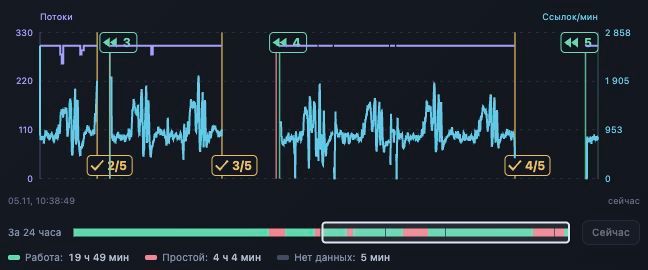
Our XRumer panel once finished a planned five-pass series at 2/5. The completed additional pass had left 11,451,178 entries in Remaining, above this installation's operating ceiling. After checking that its workers had drained, the panel closed the series and started the next numbered base part.
That decision illustrates how we automate link building operations with XRumer: a pass count sets the maximum work on a base, while observed state determines the next action. This second article follows the overview of our XRumer automation panel and examines Full and Remaining passes, completion boundaries and base selection.
Full and Remaining passes belong to one series
In this setup, a series groups the work on one selected base part. Its configured maximum is one full pass followed by up to four additional passes over Remaining targets. The first pass is numbered 1/5. The first additional pass is 2/5. Starting the next base creates a new series beginning at 1/5.
| Action | Input and series | Check before proceeding |
|---|---|---|
| Full pass | The selected base part starts a new series. | Correct instance, project and base; a confirmed start. |
| Additional Remaining pass | Further processing of Remaining from the current work, within the same series. | The previous pass is eligible to advance and the next observed run matches the intended transition. |
| Next numbered part | A different file from the same numbered family starts another series. | The expected next file is available, selected and observed before its first start. |
Remaining is an engine report category, rather than a count of verified backlinks. Its physical input can also vary. Our controller recognizes both an appended segment of the current working base and a matching Remaining report file. An arbitrary smaller file cannot establish that the intended additional pass began.
Keep the base identity, series identity and pass ordinal together. A label such as 3/5 becomes ambiguous if an operator has selected another file or a process has been replaced.
Reaching the last position does not settle every transition
The input position can reach the total while tail workers still finish their requests. Our history records the list-completion boundary separately from worker drain, because results can continue changing between those events. A chart marker showing 5/5 therefore needs its event type as well as its number.
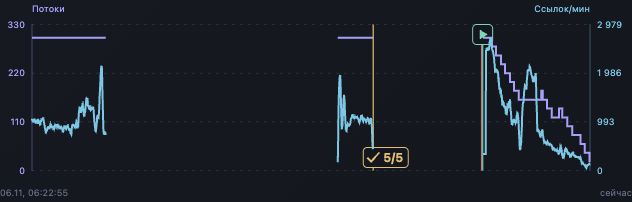
Read the transport's completion evidence too. On instances using our opted-in native MCP transport for XRumer 23.0.9 or later, an explicit successful finished state can permit an ordinary transition before the visible tail count reaches zero. That path checks the finished job, a successful stop reason and position at or beyond the total, along with fresh state and ownership.
The early-completion policy described below has a stricter boundary: it requires a recorded worker drain. A last position, zero displayed speed or an operator Stop alone cannot satisfy that policy. When a transition is waiting, inspect the missing condition before sending another command.
Confirm the next Remaining pass from fresh state
A command acknowledgment records a delivery result. The panel then checks a newer engine observation to confirm that the intended pass started. It retains the same series while assigning the next ordinal and its start kind.
- Check the previous pass. Match it to the active instance, base and series. Establish a successful completion and the boundary required by the intended action.
- Evaluate the operating policy. Compare completed passes with the configured maximum and check whether the Remaining ceiling has ended the series.
- Request the additional pass. Keep its command record attached to the previous pass and expected next ordinal.
- Observe the resulting run. Confirm fresh running state and an input transition belonging to this job. An appended Remaining segment can begin at the old end of the working file, so a nonzero starting position is possible.
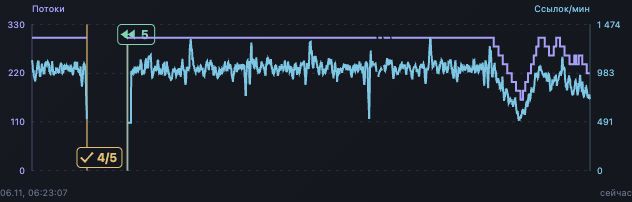
If execution remains uncertain, reconcile the command record with engine state. If XRumer explicitly rejects a request as busy, investigate readiness before another attempt. The detailed rejection and recovery incident belongs to the next article in this series.
The Remaining ceiling can finish a series early
We introduced a local Remaining-volume rule on . After a successful additional pass has ended and its workers have drained, a final Remaining count strictly greater than 1,000,000 ends further passes on that base. The rule bounds continued processing in this installation.
The controller checks that the completed pass belongs to the current series and base, that its position reached a positive total and that its final Remaining value is an integer. It saves the completion reason alongside the series. This makes an early end distinguishable from an interruption or an exhausted pass plan.
| Observed case | Decision under this rule |
|---|---|
| Successful additional pass, drained, Remaining 1,000,001 | Finish the series early, subject to the ownership and command checks. |
| Same conditions, Remaining exactly 1,000,000 | No early completion from this threshold. Evaluate the ordinary pass plan. |
| First full pass with a higher Remaining count | The rule does not apply to the first full pass. |
| Additional pass with tail workers still active | Wait for recorded drain before applying this rule. |
| Manual or error stop, or a missing final value | Insufficient evidence for early completion under this rule. |
The recorded November 3 case ended at 2/5 with 11,451,178 Remaining entries. Automatic mode then selected the next numbered part, containing 100,000 targets, and started its full pass. The run record confirmed position growth to 1,517. Private base names are omitted here.
An unsent queued additional pass can be canceled when this rule takes effect. A command already leased or dispatched keeps its ownership until its outcome is reconciled. The new decision cannot erase a possible execution.
Automatic mode loads and confirms the next numbered base
Series completion and file selection are separate operations. In automatic mode, the panel uses a fresh, complete catalog from the Windows agent to find the immediate next numbered part in the same family. For example, sample-21.txt is followed by sample-22.txt. These names are illustrative.
- Finish the current series
- Validate the next catalog entry
- Request file selection
- Observe the selected target
- Start and confirm its full pass
The catalog supplies the file name, size and modification identity. The load job retains those values. A fresh observation must then establish that the expected file is selected and its input is valid before the controller begins the new series.
A missing intermediate part blocks advancement even when a later part exists. An incomplete or stale catalog also prevents the next selection. If the catalog confirms there is no later part, the chain can finish. A missing file and a completed family therefore lead to different recorded outcomes.
Keep scheduling subordinate to these checks. A timer can request work, but it cannot establish that a base loaded or that a previous pass completed. An unconfirmed load remains a load problem to investigate.
Manual mode keeps base selection with the operator
Manual mode still monitors passes and supports the bounded sequence of Remaining passes. When that series ends, it stays on the current base instead of selecting the next numbered part. Choose it when the next file needs an operator decision.
Entering manual mode is itself an operational action: the panel's control explicitly switches mode and stops the run. Use it deliberately when work is active. Switching back to automatic mode should be followed by a state check. The toggle alone is no proof that a new pass has begun.
Record an intentional Stop separately from a successful completion. If an operator changes the selected base, confirm the new context before attaching further work to a series. The earlier base's history must continue to describe what actually ran there.
Preserve the final snapshot with the reason for ending
At the end of a series, keep the actual completed count and configured maximum together: 2/5 plus the Remaining-limit reason explains the recorded early finish. A bare 2/5 could otherwise look like an unfinished run.
Tail workers can add results after list completion, so retain the final report snapshot before the next start resets counters. Additional passes may carry cumulative report totals. Adding every pass's displayed totals can count the same reported events again.
For an operator handoff, record the following in the decision log:
- The instance, base identity, series and pass.
- Completion and drain times alongside the final Remaining value.
- The completion reason.
- The command result and next observed action.
How many XRumer passes should you run?
This case establishes how our configured maximum and early-completion rule behave. It does not determine an optimal number of passes for SEO. The million-entry ceiling is an operating choice, and the screenshots document transitions rather than a comparison of campaign performance.
Choose a pass budget from the work you can process and verify, then record why each series continues or ends. To evaluate whether another pass was useful, compare its additional verified output and resource cost. Engine report categories alone cannot answer that question.
The XRumer link building service scope should specify the result checks separately from run control. Live link presence, retention and indexation each require their own observations.
Request the XRumer Pass Decision Log
A blank CSV for pass boundaries, final Remaining values, series decisions and the next confirmed action, with dated case notes. Submit the form and our team will send the files separately by email.
Thanks. Your request for the XRumer Pass Decision Log has been received. Our team will review it and send the file separately by email. What happens next →
Sources and case scope
The operational case occurred on November 3, 2026. The two panel fragments were captured on November 6, 2026. Their tooltips supplied the event times transcribed in the captions. We reviewed the series coordinator, Remaining-limit predicate, numbered-base coordinator and manual-mode logic against the dated implementation and run records.
These policies belong to our custom panel. The vendor's XRumer FAQ provides product context, but does not prescribe this five-pass maximum or Remaining ceiling. For the system architecture and the distinction between processing reports and verified links, read the first article in the series.
Request the anonymized case notes and decision log for the dated conditions, boundary cases and screenshot provenance. The image regions exclude host identities, private base names and account controls.

About the author
Dmytro Nasyrov is the founder and CTO of Pharos Production. He holds a PhD in Artificial Intelligence.
Read Dmytro's author profile →